DLC44d 7h left
Bethesda Bundle Giveaway
Grand Prize
FREE Entry
Description
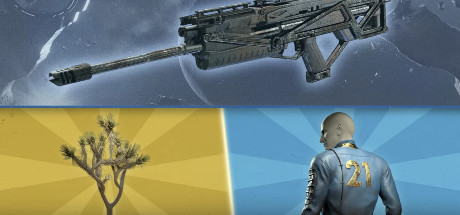
Claim your free Bethesda bundle and unlock in-game items for Fallout 76 and Starfield! This bundle includes the Vault 21 Jumpsuit and Joshua Tree for Fallout 76, along with the Battle-Hardened Beowulf weapon skin for Starfield.
Platforms
PC
Instructions
1. Log in to your Bethesda account and opt in to email communications
2. Selected the "CLAIM NOW" button
3. Click on the profile icon in the top right corner of the screen
4. Choose “Transaction History” from the drop-down menu, and view the Product Codes tab.
External entry link. Rules and conditions apply as per provider.